
Category Archives: Assistive Technology

Delve into assistive technology solutions that support communication, mobility, and independent living for individuals with physical, cognitive, or sensory challenges in all settings.

More Than Just A Slant Board!

Slant boards are an invaluable therapeutic tool. They are a staple feature in classrooms and an added bonus to a well-equipped homework station. The versatility of slant boards allows for endless uses; they can be used at desks or tables during seated work, on a counter when working in a standing position, or even on the floor when working in the prone position (pro tip- this is a great way to develop important postural muscles!).  Some great benefits to using slant boards are:

Improve Pencil Grasp!
Writing on a surface that is positioned at an approximate 20 degree angle will put the wrist in the optimal extended position. This positioning encourages better pencil grasp and fine motor control.  Therapro’s Better Boards are lightweight and portable, making it easy to access the benefits of an angled writing surface just about anywhere!

Increase Attention & Focus!
Bringing visual information closer to eye level helps increase visual attention and focus.  It can also help decrease eye strain.  Place reading material on a slant board (or even a book holder) helps bring materials closer to eye level. 

Improving Posture!

Placing work materials on a raised surface, like a slant board, can help to decrease the rounded back posture. (Pro tip, ensure the angle of the slant board is at least at 22 degrees! ) The Aluminum Adjustable Slant Board and Adjustable/Collapsible Lightweight Slant Board both feature an adjustable angle, making it easy to find the perfect height!

Increasing Accessibility!
Many slant boards feature a clip to hold and stabilize papers. This feature is beneficial for one handed access or when bilateral coordination is decreased.  Write Slant Boards have an extra large clip for even easier access!

Slant boards are a great therapeutic tool for solving a variety of visual perceptual, fine motor and postural challenges!

Allyson Locke M.S., OTR/L & Sarah Glovasky M.S., OTR/L 
Using A Battery Interrupter: As Easy As 1, 2, 3!

Incorporating battery interrupter devices into therapeutic and educational settings can significantly enhance accessibility and engagement for individuals with motor challenges. These devices allow standard battery-operated toys and tools to be adapted for use with external switches, promoting independence and participation.

What Is a Battery Interrupter?

Battery interrupters are a useful tool for making battery-operated devices or toys switch-adaptable! Battery interrupters can be used on most devices that are: 

  1. Powered by AA, AAA, C, D, or 9-Volt batteries. 
  2. Turn on or off with a single switch.

Try using a battery interrupter on a commercially available electric bubble toy for some great summer fun or on a simple, battery-operated, musical toy for a cause-and-effect teaching opportunity! 

Benefits of Using Battery Interrupter Devices

  • Enhanced Accessibility: Facilitates interaction with a variety of battery-operated devices.
  • Promotes Independence: Empowers users to control their environment with minimal assistance.
  • Versatility: Can be used across multiple settings, including homes, schools, and therapy centers.
  • Cost-Effective: Adapts existing devices, reducing the need for specialized equipment.

Step-by-Step Guide: Using Battery Interrupter Devices

Setting up a battery interrupter takes just a few simple steps. 

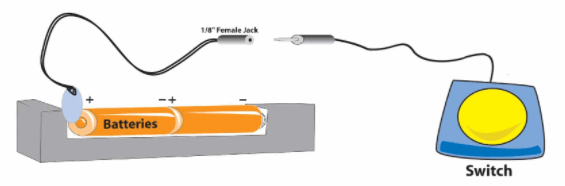
  1. Step 1: Insert the interrupter into the battery compartment between the battery and the compartment wall.  For the 9-volt interrupter, simply clip together the two connection points.   

Pro Tip 1- Only one interrupter is needed per device, regardless of how many batteries are used.

Pro Tip 2- The battery interrupter can be inserted on either the positive or negative end of the battery (n/a for the 9V size)!

  1. Close the battery compartment.

Pro Tip: You may need to cut a small notch out of the battery cover to allow the wires to fit!

  1. Connect your device.

Pro Tip: Battery interrupters work with any standard switch that has a 1/8inch jack

Helpful Hints

  1. Make sure the size of the interrupter matches the size of the battery.  
  2. Turn your device to the “on” position before using it with a switch.  
Diagram showing how to use a Battery Interrupter Device

Tips for Effective Use

  • Safety First: Always supervise the use of adapted devices to prevent accidents.
  • Regular Maintenance: Check connections and battery levels to ensure consistent performance.
  • Customization: Tailor the setup to the individual’s specific needs and preferences.

Using battery interrupter devices is a straightforward and impactful method to enhance accessibility for individuals with motor challenges. By adapting existing battery-operated items, these devices open up new avenues for interaction, learning, and independence.

PowerLink 4 Control Unit Assistive Technology Solution

Enhance Access with the PowerLink

A PowerLink is a game-changer for enhancing access, especially for users who rely on switches to interact with the environment around them.  With a PowerLink, users can take everyday, corded, electrical appliances and make them switch accessible.  The concept is simple: plug a corded appliance into the receiver of a PowerLink, pick your interaction mode on the PowerLink, and add a switch. With this setup up users can control the on and off function of whatever corded appliance is plugged in.  The PowerLink opens the door for participation in a variety of everyday activities.  

  • Enhance Access with the PowerLink in Classrooms and Offices: Tools commonly used in the classroom or in an office setting are easily made switch accessible using a Powerlink. Try plugging in an electric pencil sharpener, electric stapler, electric hole punch, or paper shredder to allow switch users to become an active participant in vocational training opportunities or classroom jobs.  
  • Enhance Access with the PowerLink in the Garage: In woodshop class or in your home garage some simple, corded tools like an electric screwdriver or hand held sander can be made switch accessible with a Powerlink.  
  • Enhance Access with the PowerLink in the Kitchen: In the kitchen, plugging in simple appliances like a blender, hand mixer or can opener to a PowerLink can help users increase their participation in cooking activities.
  • Enhance Access with the PowerLink for Self Care: A well-positioned hair dryer plugged into a Powerlink can give users more independence with self care tasks like drying their hair after a shower or fingernails after a manicure! 

Looking for fun and creative ways to use your PowerLink? Download these activity ideas:

  1. Accessible Splash Art
  2. Make Music!
  3. Stimulate the Visual Senses!
  4. Switch Adapted Car Wash
  5. Switch Adapted ‘Bowling’