Tag Archives: assistive technology professionals (ATPs)

Access curated tools, equipment, research, and resources tailored for Assistive Technology Professionals (ATPs) supporting individuals of all ages with access challenges across clinical, educational, and community-based settings to enhance functional independence.

clock and calendar icon

Top Assistive Technology Tools for Time Management Support

The ability to manage time is an essential life skill that is critical to independence. When the ability to manage time is impeded by factors like decreased executive functioning abilities or cognitive limitations, independence can also be impacted.   In this post we are covering a few mid to low tech assistive technology solutions that can support time management abilities.

Schedule Reminders

Remembering to do a task at a scheduled time is one time management skill area. While smart devices are often loaded with ‘reminder’ features, there are times when a non screen option is preferred. The Time Cue is a great option!  Simply record any message and set the time for the message to be played. 

The Time Cue allows for a single message, up to 10 seconds long to be recorded and played back at a set time. For example, record “go to gym class” and set it to play 1:25 (or whenever gym class is happening!).  There is even a space to include a picture of the activity for additional support! 
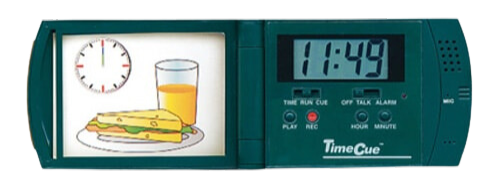
Time Cue an Assistive Technology Tool for Time Management

Sequencing Helpers

Multi step tasks are another area of time management that present their own set of challenges including remembering the order of the sequence, remembering to do all of the steps in the sequence, and doing the steps for the correct amount of time. There are a variety of assistive technology options available that can help.

Two Minute Turtle toothbrush timer

The Two Minute Turtle Toothbrush Timer helps cue the user through the steps of toothbrushing, ensuring all quadrants of the mouth are brushed for the recommended amount of time. It works by pushing a button on the top of the turtle which causes one of the turtle’s fins to light up.  Each of the turtle’s four fins represents a quadrant of the mouth. Each fin will stay lit  for the recommended 30 seconds of brushing time. When time is up, the light in one fin will turn off and the next fin will light up indicating it is time to move to the next area of the mouth! Pro tip, this is also a great tool for handwashing!

Visual schedules, whether written out or picture supported, can be a game changer for individuals who have impaired executive function skills and who need support managing multi step tasks. Schedules can be created for specific routines (like a morning self care routine), for parts of the day (like a morning classroom schedule), or the whole day.  SchKIDules offers a quick and easy solution for creating picture supported schedules.  The Home Bundle includes 72, 2”x2” magnets that depict common routines, chores, outings and extracurricular activities.  The Education Bundle includes 66, 2”x2”,  magnets that depict common school and special education activities.
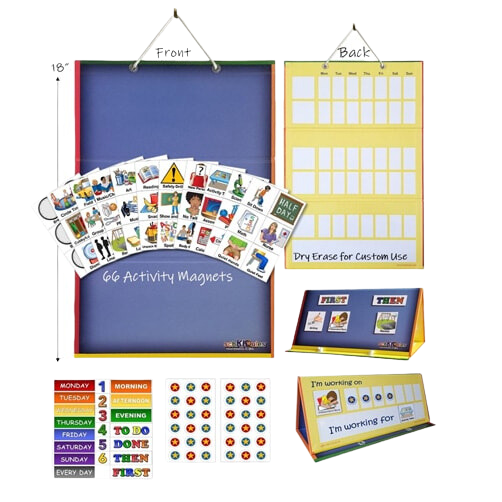
Schkidules visual schedule tool

Time Visualization Helpers 

Conceptualizing the passage of time is a third area of time management and this can be tricky!  Offering a visual repression of time and time passage can not only help with this concept but it can also decrease stress and anxiety.  Visual timers are the perfect solution for this challenge area.
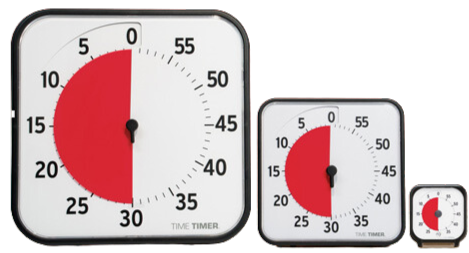
Time Timer an Assistive Technology Tool for Time Management

Time Timers offer a simple solution for time management.  With the patented red disk, Time Timer makes elapsing time concrete by reaffirming the analog clock in its clockwise movement and provides the ability to judge how much time is left without having to know how to tell time. Simply move the colored disk to the desired amount of time,  as time elapses, the colored disk disappears.  

Resetea is a time management tool that offers the ability to sequence up to 12 related tasks. It is different from a typical schedule because of the unique light cue that marks the passage of time.  To set it up, first use the included  template builder to create a sequence of tasks (for example homework and then free time or math class, English class, lunch) and then place the  visual in front of the light screen. Next set the desired time for each activity (up to 60 minutes) and press start. The activity schedule is back lit with  progress colors; no light indicates future task(s), white light indicates the task in progress, and red light indicates task(s) completed. 
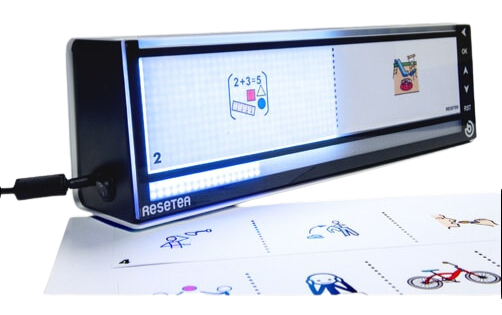
Resetea atech tool for time management

There are a variety of tools available to support users ability to manage time. Helping users access and utilize these tools will support overall independence!  
Raised Line Paper… What Is It?

Sometimes called tactile paper, Raised Line Paper is used to help individuals stay between the lines when writing. The raised line paper has raised top and bottom lines to provide tactile, proprioceptive and visual feedback to the writer. There are a variety of types of paper to choose from!

Raised Line Learning Sheets

Do you have a beginner writer? The raised line learning sheets are a good place to start from! There are letters, numbers, alphabet coloring sheets and mazes! The tactile input helps the new learners understand where to keep their pencil and crayon marks! 

Raised Line Writing Paper

There are so many options to help more advanced writers be as successful as they can. There are different sized lines (narrow and wide) depending on the level of the writer. If you need more of a visual cue there is the option to have red and blue lines on your paper. Double the input for a higher accuracy when writing. If spacing or sizing is a problem there is boxed raised line paper to provide a space for every letter to fit in. Pro tip: If all this sounds great but you are not sure what will work best the assortment pack is very helpful!

Staged Raised Line Paper

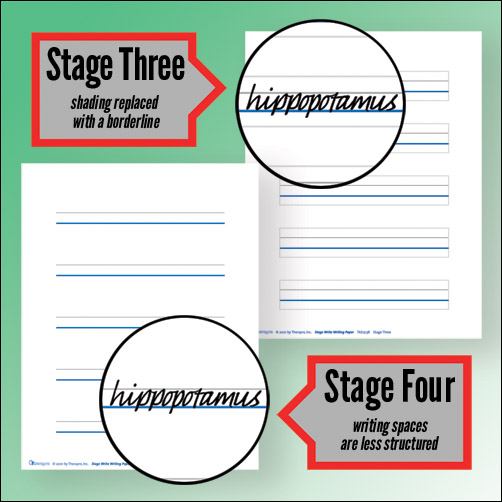
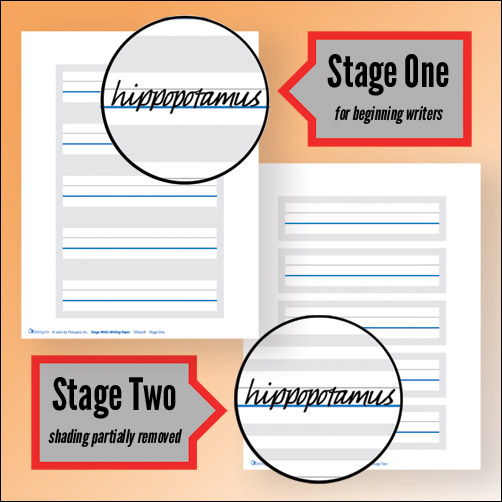
There is a product line that is able to take a writer from beginning stages right through advanced writing. This is a six stage series of handwriting papers that begins with clearly defined writing spaces and perceptual cues that fade in successive stages as the student gains mastery. The thick, colorful dark blue baselines are raised, providing not only visual cues, but also tactile cues.  Pro Tip: Students advance at their own pace so having all the stages on hand is very helpful!

Stage One: For beginning writers. Clearly defined writing spaces.

Stage Two: Writing spaces are less defined as shading is partially removed.

Stage Three: Shading has been completely removed and replaced with a borderline.

Stage Four: Writing spaces are less structured; fewer distractions than typical notebook paper.

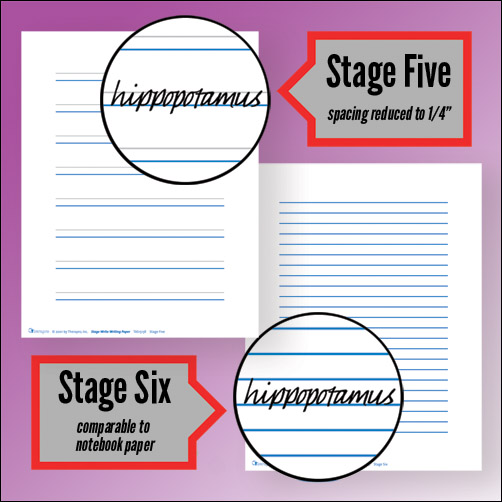
Stage Five: The most popular Stage Write paper! Spacing between blue baseline and gray guideline reduced to 1/4″.

Stage Six: Comparable to standard notebook paper. Still incorporates raised dark blue baseline and clearly defined margins.

Another great aspect of this paper is that it can be used with a variety of reading/writing/handwriting programs! Give your writers the tools they need to be successful, independent writers.

Guest Blogger: Sarah Glovasky M.S. OTR/L

More Than Just A Slant Board!

Slant boards are an invaluable therapeutic tool. They are a staple feature in classrooms and an added bonus to a well-equipped homework station. The versatility of slant boards allows for endless uses; they can be used at desks or tables during seated work, on a counter when working in a standing position, or even on the floor when working in the prone position (pro tip- this is a great way to develop important postural muscles!).  Some great benefits to using slant boards are:

Improve Pencil Grasp!
Writing on a surface that is positioned at an approximate 20 degree angle will put the wrist in the optimal extended position. This positioning encourages better pencil grasp and fine motor control.  Therapro’s Better Boards are lightweight and portable, making it easy to access the benefits of an angled writing surface just about anywhere!

Increase Attention & Focus!
Bringing visual information closer to eye level helps increase visual attention and focus.  It can also help decrease eye strain.  Place reading material on a slant board (or even a book holder) helps bring materials closer to eye level. 

Improving Posture!

Placing work materials on a raised surface, like a slant board, can help to decrease the rounded back posture. (Pro tip, ensure the angle of the slant board is at least at 22 degrees! ) The Aluminum Adjustable Slant Board and Adjustable/Collapsible Lightweight Slant Board both feature an adjustable angle, making it easy to find the perfect height!

Increasing Accessibility!
Many slant boards feature a clip to hold and stabilize papers. This feature is beneficial for one handed access or when bilateral coordination is decreased.  Write Slant Boards have an extra large clip for even easier access!

Slant boards are a great therapeutic tool for solving a variety of visual perceptual, fine motor and postural challenges!

Allyson Locke M.S., OTR/L & Sarah Glovasky M.S., OTR/L