Tag Archives: self-care

Self-care skills includes essential daily living tasks such as dressing, grooming, feeding, and personal hygiene. Resources, assistive technology, and adaptive strategies empower individuals to build functional independence across settings and age groups.

clock and calendar icon

Top Assistive Technology Tools for Time Management Support

The ability to manage time is an essential life skill that is critical to independence. When the ability to manage time is impeded by factors like decreased executive functioning abilities or cognitive limitations, independence can also be impacted.   In this post we are covering a few mid to low tech assistive technology solutions that can support time management abilities.

Schedule Reminders

Remembering to do a task at a scheduled time is one time management skill area. While smart devices are often loaded with ‘reminder’ features, there are times when a non screen option is preferred. The Time Cue is a great option!  Simply record any message and set the time for the message to be played. 

The Time Cue allows for a single message, up to 10 seconds long to be recorded and played back at a set time. For example, record “go to gym class” and set it to play 1:25 (or whenever gym class is happening!).  There is even a space to include a picture of the activity for additional support! 
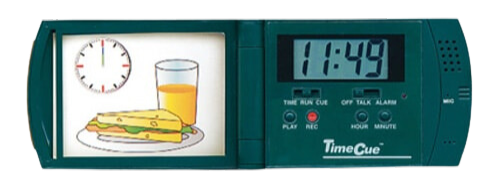
Time Cue an Assistive Technology Tool for Time Management

Sequencing Helpers

Multi step tasks are another area of time management that present their own set of challenges including remembering the order of the sequence, remembering to do all of the steps in the sequence, and doing the steps for the correct amount of time. There are a variety of assistive technology options available that can help.

Two Minute Turtle toothbrush timer

The Two Minute Turtle Toothbrush Timer helps cue the user through the steps of toothbrushing, ensuring all quadrants of the mouth are brushed for the recommended amount of time. It works by pushing a button on the top of the turtle which causes one of the turtle’s fins to light up.  Each of the turtle’s four fins represents a quadrant of the mouth. Each fin will stay lit  for the recommended 30 seconds of brushing time. When time is up, the light in one fin will turn off and the next fin will light up indicating it is time to move to the next area of the mouth! Pro tip, this is also a great tool for handwashing!

Visual schedules, whether written out or picture supported, can be a game changer for individuals who have impaired executive function skills and who need support managing multi step tasks. Schedules can be created for specific routines (like a morning self care routine), for parts of the day (like a morning classroom schedule), or the whole day.  SchKIDules offers a quick and easy solution for creating picture supported schedules.  The Home Bundle includes 72, 2”x2” magnets that depict common routines, chores, outings and extracurricular activities.  The Education Bundle includes 66, 2”x2”,  magnets that depict common school and special education activities.
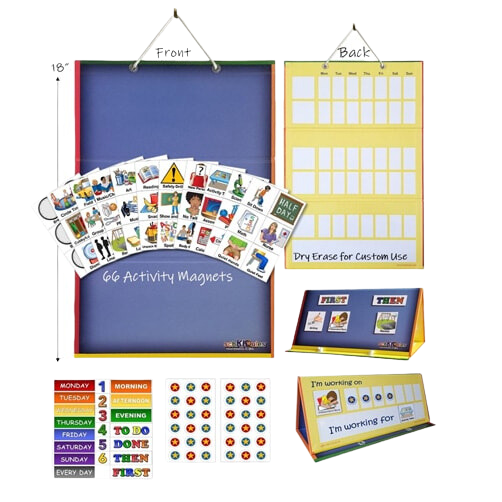
Schkidules visual schedule tool

Time Visualization Helpers 

Conceptualizing the passage of time is a third area of time management and this can be tricky!  Offering a visual repression of time and time passage can not only help with this concept but it can also decrease stress and anxiety.  Visual timers are the perfect solution for this challenge area.
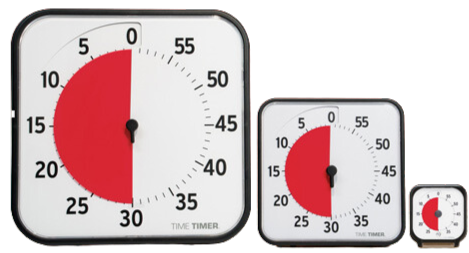
Time Timer an Assistive Technology Tool for Time Management

Time Timers offer a simple solution for time management.  With the patented red disk, Time Timer makes elapsing time concrete by reaffirming the analog clock in its clockwise movement and provides the ability to judge how much time is left without having to know how to tell time. Simply move the colored disk to the desired amount of time,  as time elapses, the colored disk disappears.  

Resetea is a time management tool that offers the ability to sequence up to 12 related tasks. It is different from a typical schedule because of the unique light cue that marks the passage of time.  To set it up, first use the included  template builder to create a sequence of tasks (for example homework and then free time or math class, English class, lunch) and then place the  visual in front of the light screen. Next set the desired time for each activity (up to 60 minutes) and press start. The activity schedule is back lit with  progress colors; no light indicates future task(s), white light indicates the task in progress, and red light indicates task(s) completed. 
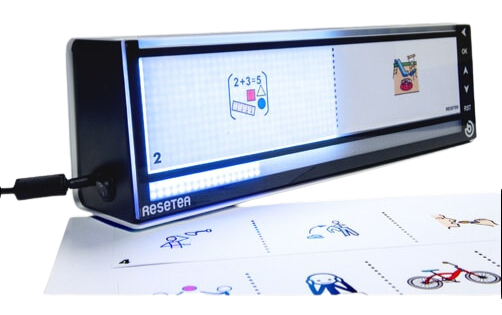
Resetea atech tool for time management

There are a variety of tools available to support users ability to manage time. Helping users access and utilize these tools will support overall independence!  

PowerLink 4 Control Unit Assistive Technology Solution

Enhance Access with the PowerLink

A PowerLink is a game-changer for enhancing access, especially for users who rely on switches to interact with the environment around them.  With a PowerLink, users can take everyday, corded, electrical appliances and make them switch accessible.  The concept is simple: plug a corded appliance into the receiver of a PowerLink, pick your interaction mode on the PowerLink, and add a switch. With this setup up users can control the on and off function of whatever corded appliance is plugged in.  The PowerLink opens the door for participation in a variety of everyday activities.  

  • Enhance Access with the PowerLink in Classrooms and Offices: Tools commonly used in the classroom or in an office setting are easily made switch accessible using a Powerlink. Try plugging in an electric pencil sharpener, electric stapler, electric hole punch, or paper shredder to allow switch users to become an active participant in vocational training opportunities or classroom jobs.  
  • Enhance Access with the PowerLink in the Garage: In woodshop class or in your home garage some simple, corded tools like an electric screwdriver or hand held sander can be made switch accessible with a Powerlink.  
  • Enhance Access with the PowerLink in the Kitchen: In the kitchen, plugging in simple appliances like a blender, hand mixer or can opener to a PowerLink can help users increase their participation in cooking activities.
  • Enhance Access with the PowerLink for Self Care: A well-positioned hair dryer plugged into a Powerlink can give users more independence with self care tasks like drying their hair after a shower or fingernails after a manicure! 

Looking for fun and creative ways to use your PowerLink? Download these activity ideas:

  1. Accessible Splash Art
  2. Make Music!
  3. Stimulate the Visual Senses!
  4. Switch Adapted Car Wash
  5. Switch Adapted ‘Bowling’

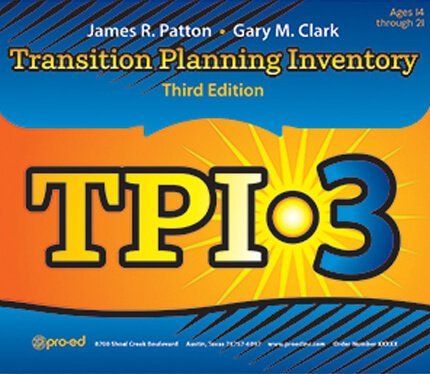
Transition Planning Inventory-3 Overview & Review

The Transition Planning Inventory - Third Edition

The Individuals with Disabilities Act (IDEA) of 1990 instituted a transition mandate for students receiving special education services.  IDEA 2004 expanded on this to include planning across all areas including community participation, independent living, and continuing education. The Transition Planning Inventory, now in its 3rd edition, was designed to address these mandates. As described in the TPI-3 Administration and Resource Guide, the primary purpose of the TPI-3 is “to assess the transition needs, strengths, preferences, and interest of students at the secondary level” (Patton & Clark, 2021, 14*)   The domains covered within the TPI-3 are working, learning, & living. 

Information is gathered from:

Core Rating Forms 

  • Three forms (Student, Home, and School) Each form contains 57 statements related to transition planning.
  • Each form is organized according to 11 planning areas; Career Choice & Planning, Employment Knowledge & Skills, Post Secondary Training/ Education, Functional Communication, Self Determination, Independent Living, Personal Money Management, Community Involvement & Usage, Leisure and Recreation, Health, & Social/Interpersonal Relationships.

Preference &  Interest Forms

  • Intended to gather information about a students preference and interest
  • Two versions available; basic (intended to be used early in the transition process) and advanced (intendended to be administered when a student is close to leaving school).
  • An optional Home Preference and Interest Form is also available.

Information is compiled through:

Profile & Further Assessment Recommendation Form

  • All information is summarized on this form consisting of 6 sections; 1.) general information, 2.) likely setting for postsecondary outcomes, 3.) student’s preference, interests, and strengths, 4.) results of other assessments, 5.) student profile, 6.) further assessment and information.

Summary of Performance Data

  • The purpose of this form is to give users a quick and easy way to compile the information required by IDEA into a Summary of Performance (SOP) document.  

Overall, the TPI-3 provides a comprehensive means to gather key information from all major players in order to create and implement a meaningful transition plan.

Quick Facts

Age Range: 14-21

Administration Time:
Student Rating Form:

  • 15-20 minutes to complete independently
  • 25-30 minutes if administered orally and/or with support.

The Home Core Rating:

  • 15-20 minutes to complete independently
  • 25-30 minutes if administered orally and/or with support.
  • The School Rating Form 10-12 minutes

Student Performance & Interest Form:

  • 10 to 15 minutes to complete independently
  • 20-25 minutes if administered orally and/or with guidance.

Profile & Further Assessment Recommendation Form

  • 10-15 minutes

Publication Year: 2021

Authors:
James R. Patton
Gary M. Clark

Administration Type: Individual

Scoring: Inventory rated on a scale from 0 (strongly disagree) to 5 (strongly agree)

*Patton, J. R., & Clark, G. M. (2021). Transition Planning Inventory Administration and Resource Guide (3rd ed.). Pro-Ed.